> For the complete documentation index, see [llms.txt](https://docs.nimbalyst.com/llms.txt). Markdown versions of documentation pages are available by appending `.md` to page URLs; this page is available as [Markdown](https://docs.nimbalyst.com/session-management/workstreams.md).

# Workstreams

Workstreams group related AI sessions that touch the same files or topic, so you can branch an approach without losing the earlier thread.

A workstream is a group of related AI sessions that appear together as tabs, share one combined view of edited files, and are grouped as one item in your session list. Use a workstream when several sessions belong to the same effort: trying a second approach to the same problem, running a side task in parallel, or splitting a big job across a few agents.

You never create a workstream from the New session menu. A workstream forms automatically the moment a session gains a second session.

### Creating a workstream

Start a session as usual. When you want to branch your work or run a related task alongside it, click the **+** button next to the session tab. The tooltip reads **New session in workstream**.

<figure><img src="https://562749618-files.gitbook.io/~/files/v0/b/gitbook-x-prod.appspot.com/o/spaces%2FiVUeHZHlFlZrZt02syRC%2Fuploads%2Fgit-blob-94572852e602599e0f9c3a367c46675d64996fbb%2Fdocs-workstream-add-session.png?alt=media" alt="The plus button at the right edge of the session tab bar"><figcaption><p>Click + beside the session tabs to add a related session.</p></figcaption></figure>

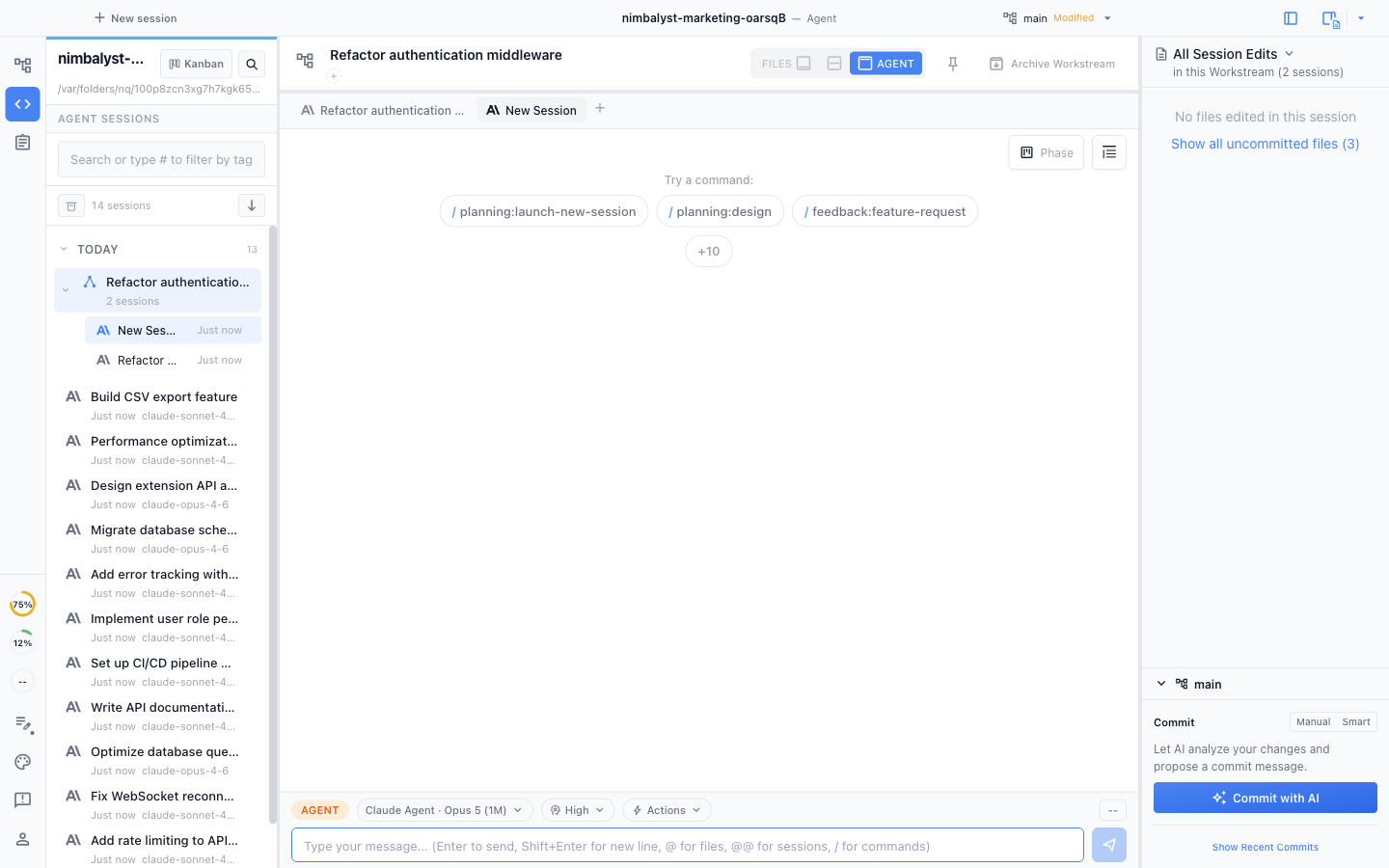
Your single session converts into a workstream. Each session gets its own tab, and the session list on the left groups them under one parent with a session count.

<figure><img src="https://562749618-files.gitbook.io/~/files/v0/b/gitbook-x-prod.appspot.com/o/spaces%2FiVUeHZHlFlZrZt02syRC%2Fuploads%2Fgit-blob-416dcc478e86d829bb794eb4c2be9eb7b3878354%2Fdocs-workstream-tabs.png?alt=media" alt="A workstream open in the Agent window with two related session tabs across the top"><figcaption><p>The original session becomes a workstream, with a tab for each related session.</p></figcaption></figure>

### One view of every file changed

The right panel shows all files modified across every session in the workstream, so you can review the combined result of the work in one place.

<figure><img src="https://562749618-files.gitbook.io/~/files/v0/b/gitbook-x-prod.appspot.com/o/spaces%2FiVUeHZHlFlZrZt02syRC%2Fuploads%2FlVaongwNZ6iNS0UzKFDN%2Fimage.png?alt=media&amp;token=601dd8ca-1c22-4b14-84ad-cd35a3c8d8eb" alt="The files panel listing files edited across all sessions in the workstream"><figcaption><p>Files edited by any session in the workstream, in one list.</p></figcaption></figure>

Click a file to open it right there in Agent mode, next to the sessions that changed it.

<figure><img src="https://562749618-files.gitbook.io/~/files/v0/b/gitbook-x-prod.appspot.com/o/spaces%2FiVUeHZHlFlZrZt02syRC%2Fuploads%2Fs5JJaGk7uCFMOPl7V0Bb%2FFiles%20in%20Agent.png?alt=media&amp;token=b3ed9bdb-4d16-4a87-b98c-91a8920d42e4" alt="A file from the workstream open in the Agent mode editor"><figcaption><p>Click a file to review it in Agent mode.</p></figcaption></figure>

Right-click a file to open it in Files mode instead.

<figure><img src="https://562749618-files.gitbook.io/~/files/v0/b/gitbook-x-prod.appspot.com/o/spaces%2FiVUeHZHlFlZrZt02syRC%2Fuploads%2F20zlCUi2LATrtWBh8sNx%2Fimage.png?alt=media&amp;token=31a31d97-f077-45f6-ac1c-5ff86c7351e0" alt="The right-click menu on a file, with the option to open it in Files mode"><figcaption><p>Right-click for the option to open in Files mode.</p></figcaption></figure>

### Workstreams and worktrees

These are easy to mix up:

* A **workstream** groups sessions. By default, its sessions share the same project folder and branch; grouping sessions does not itself isolate their file changes.
* A **worktree** gives a session its own git branch and folder, isolated from your main checkout. With Developer Mode enabled, choose **New Worktree** from the New session menu.

Use a workstream to organize related sessions; use a worktree when a session's changes should stay off your main branch. A session in a worktree can also grow into a workstream, so the two combine.

For running many agents against one project at once, see [agent orchestration](https://nimbalyst.com/features/agent-orchestration/) and [parallel Claude Code sessions](https://nimbalyst.com/parallel-claude-code-sessions/).

### Letting the agent add sessions

You can also ask the agent working in a session to spin off a sibling for a side task, without leaving the current session. Run `/launch-new-session` and describe the side task.

By default the new session joins the caller's workstream as a **sibling**, so the edited-files view and workstream overview are shared. The original session stays focused on its own thread while the sibling runs in parallel. You can mention the reasoning effort you want the new session to run at, or let the agent pick one that fits the work.

If the side task should be fully separate, say so ("isolated bug fix", "fix and commit separately") and the agent creates a top-level session instead of a sibling. Either kind can also be put on its own worktree branch; sibling-vs-isolated and worktree are independent choices.

You can also launch sibling sessions from the composer's Actions dropdown by configuring an Action with `launch: new-session`. See [AI Actions](/session-management/ai-actions.md) for the config keys.

### Why use workstreams

* Keep related work organized without losing context
* Compare different approaches to the same problem side by side
* Review all file changes from multiple sessions in one place


---

# Agent Instructions
This documentation is published with GitBook. GitBook is the documentation platform designed so that both humans and AI agents can read, navigate, and reason over technical content effectively. Learn more at gitbook.com.

## Querying This Documentation
If you need additional information that is not directly available in this page, you can query the documentation dynamically by asking a question.

Perform an HTTP GET request on the current page URL with the `ask` query parameter, and the optional `goal` query parameter:

```
GET https://docs.nimbalyst.com/session-management/workstreams.md?ask=<question>&goal=<endgoal>
```

`ask` is the immediate question: it should be specific, self-contained, and written in natural language.
`goal` is optional and describes the broader end goal you are ultimately trying to accomplish on behalf of the user. GitBook uses it to tailor the answer towards what is most useful for that goal.

The response will contain a direct answer to the question and relevant excerpts and sources from the documentation.

Use this mechanism when the answer is not explicitly present in the current page, you need clarification or additional context, or you want to retrieve related documentation sections.