> For the complete documentation index, see [llms.txt](https://docs.nimbalyst.com/llms.txt). Markdown versions of documentation pages are available by appending `.md` to page URLs; this page is available as [Markdown](https://docs.nimbalyst.com/setup-nimbalyst/alpha-features.md).
# Alpha Features
Find and enable alpha features in Nimbalyst, understand the separate Alpha update channel, and see which capabilities are still experimental.
Nimbalyst labels early capabilities as **Alpha** while we polish them. Most have their own opt-in toggle and may be unstable. A few capabilities are available only in Alpha builds.
### Where to enable Alpha
Most alpha features are opt-in per user from the feature's own settings panel, with no master "enable everything" toggle. Voice Mode and alpha agent providers use their own panels. Super Loops, Blitz, and Meta Agent are toggled under **Agent Features**.
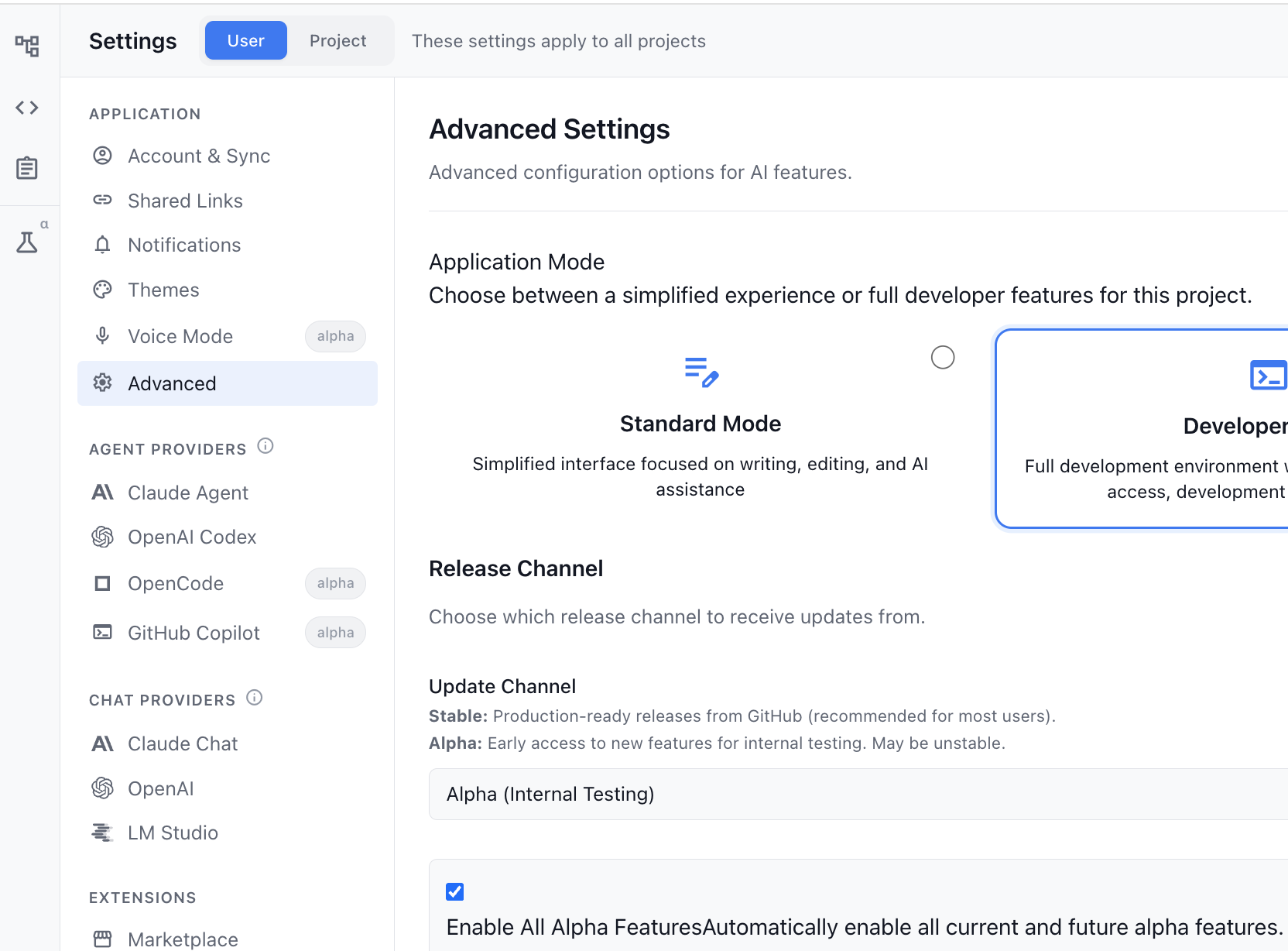
To turn one on, open **Nimbalyst → Settings**, find the feature panel, and flip its toggle. The exception is alpha-build functionality such as syncing markdown documents to the iOS app: switch **Settings > Application > Advanced > Update Channel** to Alpha first, then enable **Docs** for the project under **Settings > Account > Mobile App**.
What has shipped out of alpha is listed on the [changelog](https://nimbalyst.com/changelog/).
### How Alpha features are labeled
Anywhere an alpha feature appears in the UI, it is tagged with an `alpha` chip next to its name. For example, in the Settings sidebar Voice Mode, OpenCode, and GitHub Copilot all show the chip:
Alpha-tagged entries in the Settings sidebar
This makes it easy to tell at a glance which capabilities are in early access.
### Update Channel
The **Update Channel** selector lives in **Settings > Application > Advanced**. Choose **Stable** for production-ready releases, or **Alpha (Developer Releases)** for frequent, rough builds. Most feature toggles are independent of the channel, while features that only ship in alpha builds require the Alpha channel.
### Currently in Alpha
The following features are available in Alpha today:
#### Voice Mode
Talk to your coding agent and have it talk back, on desktop and mobile. Turn it on under **Settings > Application > Voice Mode**. For everything it can do, the settings, and the mobile voice actions, see [Voice Mode](/setup-nimbalyst/voice-mode.md).
#### OpenCode (Agent Provider)
OpenCode is available as an additional agent provider alongside Claude Agent and OpenAI Codex. Select it under **Settings > Application > OpenCode**. See [AI Provider Setup and Notifications](/setup-nimbalyst/ai-provider-setup-and-notifications.md) for configuration details.
#### GitHub Copilot (Agent Provider)
GitHub Copilot is available as an additional agent provider. Select it under **Settings > Application > GitHub Copilot**. See [AI Provider Setup and Notifications](/setup-nimbalyst/ai-provider-setup-and-notifications.md) for configuration details.
#### Grok Build, Cursor Agent, and Gemini (Agent Providers)
These providers also have alpha-tagged panels under **Settings > Application > Agent Providers**. Grok Build uses your Grok CLI login, Cursor Agent uses your Cursor CLI login, and Gemini uses the language server bundled with Google's Antigravity desktop app. See [AI Provider Setup and Notifications](/setup-nimbalyst/ai-provider-setup-and-notifications.md) for configuration details.
#### Agent Features
A consolidated panel for agent-session behavior. Its individual alpha toggles are **Super Loops**, **Blitz**, and **Meta Agent**. The panel also holds related settings such as Auto-approve Commits, MCP server status, preferred agent language, and attachment staging. Find it under **Settings > Application > Agent Features**.
#### Database Recovery
In Developer Mode, **Settings > Application > Database** is alpha-tagged. It shows migration status and preserved recovery copies. Use it only when diagnosing or recovering the app database; see [Database Backups and Restore](/troubleshooting/database-backups-and-restore.md).
### A note on stability
Alpha features may change, break, or be removed without notice. If you hit a problem, please share feedback via Discord or our support channels — see [feedback-discord-support-releases.md](/getting-started/feedback-discord-support-releases.md).
---
# Agent Instructions
This documentation is published with GitBook. GitBook is the documentation platform designed so that both humans and AI agents can read, navigate, and reason over technical content effectively. Learn more at gitbook.com.
## Querying This Documentation
If you need additional information that is not directly available in this page, you can query the documentation dynamically by asking a question.
Perform an HTTP GET request on the current page URL with the `ask` query parameter, and the optional `goal` query parameter:
```
GET https://docs.nimbalyst.com/setup-nimbalyst/alpha-features.md?ask=&goal=
```
`ask` is the immediate question: it should be specific, self-contained, and written in natural language.
`goal` is optional and describes the broader end goal you are ultimately trying to accomplish on behalf of the user. GitBook uses it to tailor the answer towards what is most useful for that goal.
The response will contain a direct answer to the question and relevant excerpts and sources from the documentation.
Use this mechanism when the answer is not explicitly present in the current page, you need clarification or additional context, or you want to retrieve related documentation sections.