# Custom Tracker Types

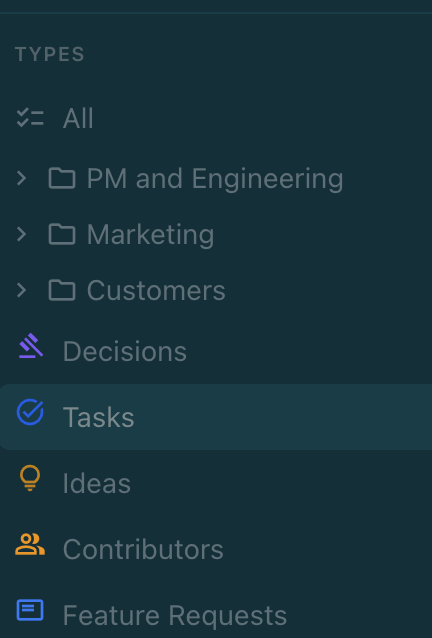
Beyond the six built-in types, you can define custom tracker types using YAML configuration files. Custom types get the same kanban board, detail view, and AI integration as built-in types.

### Where to Define Custom Types

Create YAML files in your project's `.nimbalyst/trackers/` directory. Each file defines one custom tracker type. Nimbalyst loads these definitions when the workspace opens.

<figure><img src="/files/Imv7Dwd7jLVf1XRtfABL" alt=""><figcaption></figcaption></figure>

### Example: Customer Feedback

```yaml
# .nimbalyst/trackers/customer-feedback.yaml
type: customer-feedback
displayName: Customer Feedback
displayNamePlural: Customer Feedback
icon: feedback
color: "#f59e0b"

modes:
  inline: true
  fullDocument: false

idPrefix: fb
idFormat: ulid

fields:
  - name: title
    type: string
    required: true
  - name: status
    type: select
    default: new
    options:
      - value: new
        label: New
        icon: fiber_new
      - value: reviewing
        label: Reviewing
        icon: psychology
      - value: planned
        label: Planned
        icon: event
      - value: shipped
        label: Shipped
        icon: rocket_launch
      - value: wont-fix
        label: Won't Fix
        icon: block
  - name: source
    type: select
    options:
      - value: support
        label: Support Ticket
      - value: interview
        label: User Interview
      - value: survey
        label: Survey
      - value: social
        label: Social Media
  - name: customerName
    type: string
  - name: priority
    type: select
    options:
      - value: low
        label: Low
      - value: medium
        label: Medium
      - value: high
        label: High
      - value: critical
        label: Critical

roles:
  title: title
  workflowStatus: status
  priority: priority
```

### Field Types Reference

| Type          | Description                | Options                                                |
| ------------- | -------------------------- | ------------------------------------------------------ |
| `string`      | Single-line text           | `minLength`, `maxLength`                               |
| `text`        | Multi-line text            | --                                                     |
| `number`      | Numeric value              | `min`, `max`                                           |
| `select`      | Single choice from options | `options` array with `value`, `label`, `icon`, `color` |
| `multiselect` | Multiple choices           | Same as `select`                                       |
| `date`        | Calendar date              | --                                                     |
| `datetime`    | Date and time              | --                                                     |
| `boolean`     | True/false toggle          | --                                                     |
| `user`        | Person reference           | --                                                     |
| `array`       | List of values             | `itemType`                                             |

### Field Properties

| Property        | Description                                 |
| --------------- | ------------------------------------------- |
| `name`          | Field identifier (used in code and YAML)    |
| `type`          | One of the types listed above               |
| `required`      | Must have a value when creating             |
| `default`       | Initial value for new items                 |
| `displayInline` | Show in compact inline view (default: true) |
| `readOnly`      | Cannot be edited by users                   |

### Roles

Roles map your custom fields to standard tracker behaviors:

| Role             | Purpose                                  |
| ---------------- | ---------------------------------------- |
| `title`          | Which field is the item's display title  |
| `workflowStatus` | Which field drives kanban columns        |
| `priority`       | Which field is the priority level        |
| `assignee`       | Which field is the item owner            |
| `tags`           | Which field contains categorization tags |
| `progress`       | Which field tracks completion percentage |
| `dueDate`        | Which field is the deadline              |
| `startDate`      | Which field is the start date            |

### Schema Properties

| Property             | Description                                    | Default  |
| -------------------- | ---------------------------------------------- | -------- |
| `type`               | Unique identifier for this type                | Required |
| `displayName`        | Singular display name                          | Required |
| `displayNamePlural`  | Plural display name                            | Required |
| `icon`               | Material Design icon name                      | Required |
| `color`              | Hex color for the icon                         | Required |
| `modes.inline`       | Show as inline markers in markdown             | `true`   |
| `modes.fullDocument` | Can be a full markdown document                | `false`  |
| `idPrefix`           | 2-3 character prefix for IDs                   | Required |
| `idFormat`           | ID generation: `ulid`, `uuid`, or `sequential` | `ulid`   |
| `creatable`          | Can users create items of this type            | `true`   |


---

# Agent Instructions: Querying This Documentation

If you need additional information that is not directly available in this page, you can query the documentation dynamically by asking a question.

Perform an HTTP GET request on the current page URL with the `ask` query parameter:

```
GET https://docs.nimbalyst.com/task-management/custom-tracker-types.md?ask=<question>
```

The question should be specific, self-contained, and written in natural language.
The response will contain a direct answer to the question and relevant excerpts and sources from the documentation.

Use this mechanism when the answer is not explicitly present in the current page, you need clarification or additional context, or you want to retrieve related documentation sections.