> For the complete documentation index, see [llms.txt](https://docs.nimbalyst.com/llms.txt). Markdown versions of documentation pages are available by appending `.md` to page URLs; this page is available as [Markdown](https://docs.nimbalyst.com/team-collaboration/decisions.md).
# Decision Blocks in Documents
Put a decision question inside the document it is about. Author it as an answerable field, decide it yourself or ask teammates, and seal an attributed outcome that stays in the markdown.
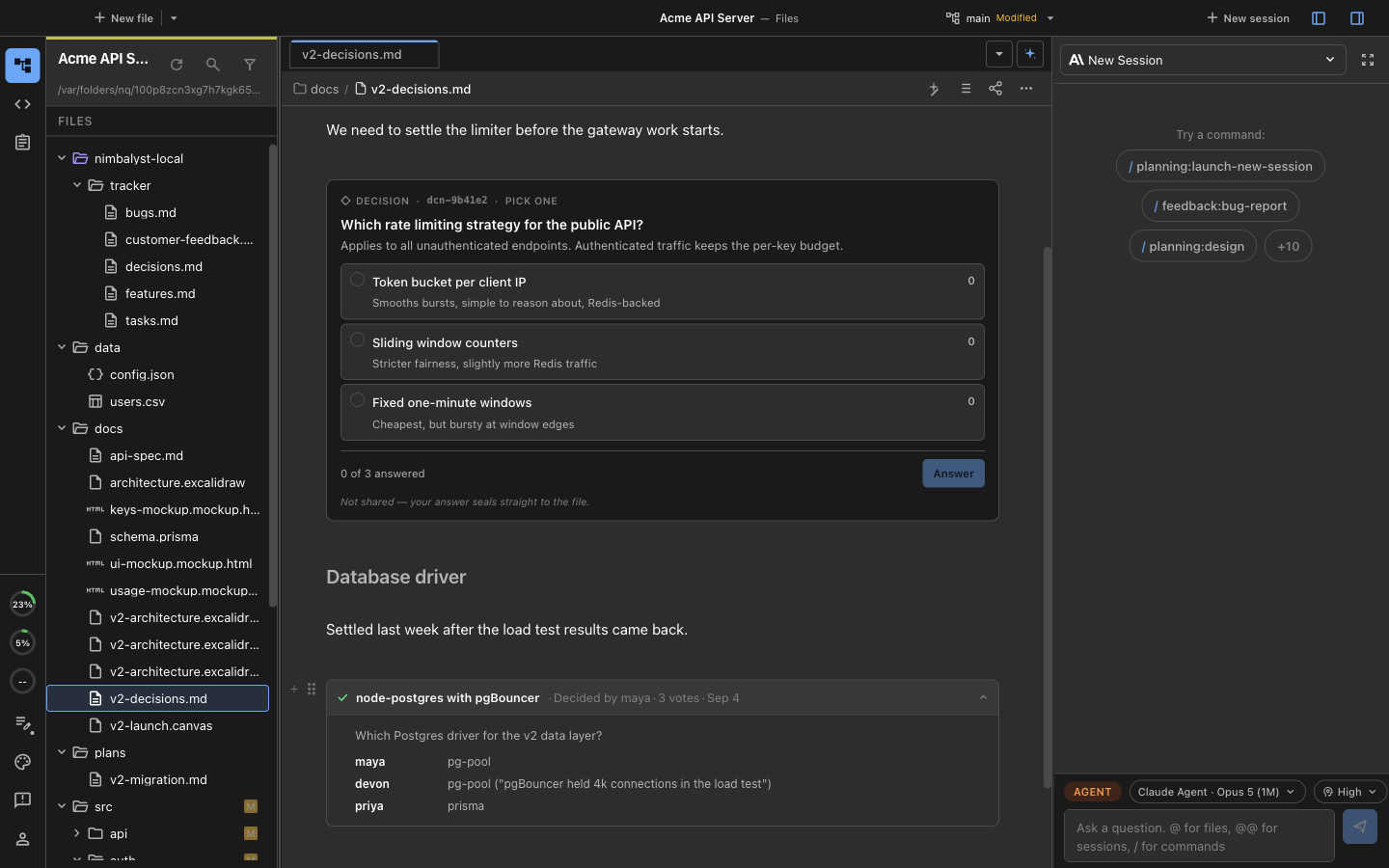
A decision block is a question that lives inside a document. Instead of settling "which layout do we ship?" in a chat thread three tools away from the mockups, the question sits in the plan next to the options, collects answers, and ends with a sealed outcome written into the markdown itself. The decision travels with the document.
An open question with its options, and a sealed decision below it with every vote attributed in the expanded outcome.
## Inserting a Decision Question
In any markdown document, type `/` (or open the component picker) and choose **Decision question**. The picker matches on **decision**, **question**, **feedback**, **poll**, and **vote**, so any of those words finds it.
## Authoring the Question
A decision block is a field people answer, not a paragraph they reply to. Six ask types cover the shapes a decision takes:
| Ask type | What the answerer does |
| -------------- | -------------------------------------------------- |
| Choose one | Chooses a single option |
| Choose several | Checks any number of options |
| Rank options | Drags options into an order |
| Rate 1 to 5 | Picks a value on a scale you label at both ends |
| Yes or no | Confirms or declines |
| Edit a draft | Revises a draft you seed and returns their version |
Choose-one and rank asks can carry a live artifact per option: a document, tracker item, file, or session rendered as a preview instead of a text label. Voting on "which mockup?" means looking at the mockups.
## Deciding Alone
A decision block does not require an audience. Use one to frame a choice for yourself, weigh the options, and seal the outcome so the document records what was decided and why. A plan that accumulates sealed decisions is its own history.
## Asking Teammates
Open **Ask teammates** on the block to pick recipients and send it. The question lands in each person's Inbox, and the block shows how many of the people asked have answered.
{% hint style="info" %}
Asking teammates requires [Nimbalyst Teams](/team-collaboration/overview.md) and a shared document. Everyone you ask has to be a member of your organization.
{% endhint %}
Answers are private. Each reply lands in a counted tally rather than in the document text, so the block shows the running count while it collects, and the first answer cannot anchor everyone after it. Teammates who are not at their desktop can answer in the [web console](/team-collaboration/web-console.md) through a link that opens the document at the block.
## Sealing the Outcome
When you are ready to settle the question, seal the block with an outcome. The seal is attributed by name and written into the markdown of the document itself, so the decision is readable anywhere the file goes: in Nimbalyst, in a diff, in a plain text editor, or by an agent reading the raw file. Reaching the number of answers you asked for marks the question answered, but only a person seals it.
## Agents Ask With the Same Blocks
When your agent composes a [feedback request](/team-collaboration/feedback-requests.md), it is writing these same decision blocks into a shared document. Sealing one wakes the session that asked, so the agent continues its work with the results. Everything on this page about ask types, private answers, and sealing applies there too.
---
# Agent Instructions
This documentation is published with GitBook. GitBook is the documentation platform designed so that both humans and AI agents can read, navigate, and reason over technical content effectively. Learn more at gitbook.com.
## Querying This Documentation
If you need additional information that is not directly available in this page, you can query the documentation dynamically by asking a question.
Perform an HTTP GET request on the current page URL with the `ask` query parameter, and the optional `goal` query parameter:
```
GET https://docs.nimbalyst.com/team-collaboration/decisions.md?ask=&goal=
```
`ask` is the immediate question: it should be specific, self-contained, and written in natural language.
`goal` is optional and describes the broader end goal you are ultimately trying to accomplish on behalf of the user. GitBook uses it to tailor the answer towards what is most useful for that goal.
The response will contain a direct answer to the question and relevant excerpts and sources from the documentation.
Use this mechanism when the answer is not explicitly present in the current page, you need clarification or additional context, or you want to retrieve related documentation sections.