> For the complete documentation index, see [llms.txt](https://docs.nimbalyst.com/llms.txt). Markdown versions of documentation pages are available by appending `.md` to page URLs; this page is available as [Markdown](https://docs.nimbalyst.com/visual-editors-powered-by-ai/animations.md).

# Animations

Author animated explainer diagrams as .anim.json files. Describe what is true at each step, scrub the timeline, and export to MP4 or GIF, with your agent doing the drawing.

An animation is a diagram that plays. Use one to show how a system, protocol, or process behaves over time: a request moving through a cache, a sync handshake, a pipeline filling stage by stage. Animations live in your project as `.anim.json` files and open in a dedicated editor with a live stage and a scrubbable timeline.

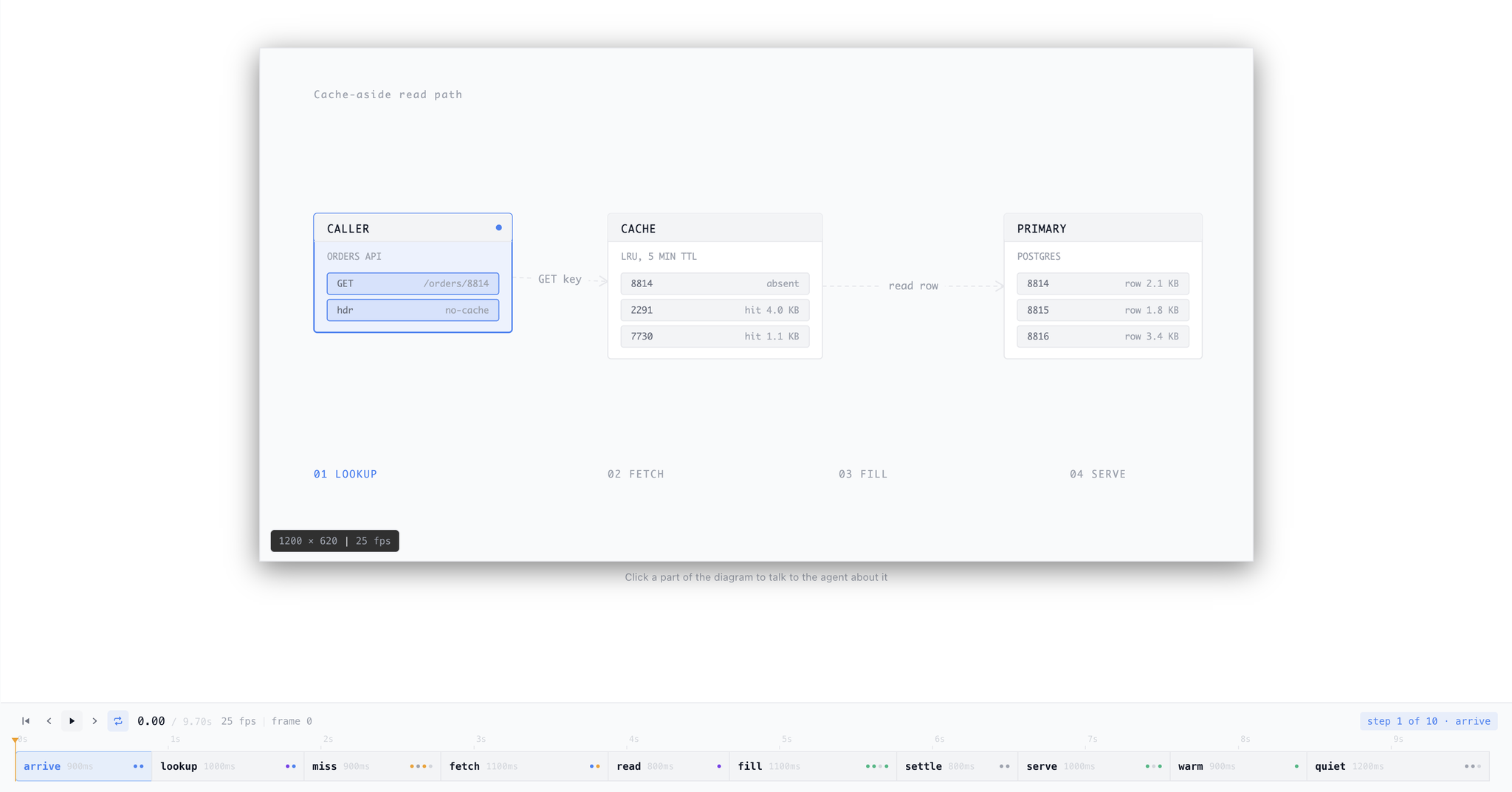
<figure><img src="https://562749618-files.gitbook.io/~/files/v0/b/gitbook-x-prod.appspot.com/o/spaces%2FiVUeHZHlFlZrZt02syRC%2Fuploads%2Fgit-blob-c5ef14d47533944b3a6c15c27c9ee63d96664555%2Fanimation-editor.png?alt=media" alt="The animation editor showing a cache-aside read path diagram on the stage, with a step-based timeline below and playback controls"><figcaption><p>The stage shows the scene; the timeline below is the list of steps. Drag the playhead to scrub, or drag a step boundary to change how long a beat holds.</p></figcaption></figure>

## Steps, Not Keyframes

An animation is a named scene plus an ordered list of steps. Each step says what is true at that beat: a node becomes active, an edge starts flowing, a label lights up. The editor handles the motion between beats, so there are no keyframes, easing curves, or property tracks to manage.

States are cumulative. A step asserts only what changes, and anything it does not mention keeps whatever the previous step left it in.

The scene is built from five part types: nodes, edges, labels, shapes, and HTML blocks for real product UI the primitives cannot draw. Parts take semantic tones that follow the viewer's theme, so one file reads correctly in light and dark mode. Parts can also show a spinning indicator for a running or loading state.

## Working in the Editor

* **Scrub and retime.** Drag the playhead through the timeline, or drag a step boundary to change a beat's duration.
* **Click a part to talk about it.** Clicking any node, edge, or label puts it in chat context along with its current state and time, so you can ask your agent to change exactly that thing.
* **Plays inline in the transcript.** When an agent creates or edits an animation, it appears in the session transcript as a click-to-activate stage, so you can watch the result without opening a tab.

## Export

Render an animation to a standalone HTML file, an animated GIF, or an MP4. The exports are self-contained, so they drop into a doc, a slide, or a social post as they are.

## Plain-Text Files

An animation is a single `.anim.json` file: plain JSON, no binary format. It sits in your repository with everything else, syncs like any other file, and diffs readably in a pull request. Any agent can author or edit one with ordinary file edits.

## Working with AI

The `/animate` command creates an explainer from a description. You can also just ask:

* "Animate how a request flows through the cache-aside read path."
* "Turn this architecture diagram into an animation that walks through the deploy."
* "Make the retry step hold longer and mark the queue as running while it waits."
* "Export this animation as an MP4."

## Installing

Animation is installable from the Extensions marketplace. See [Extension System & Marketplace](/extensions/extension-system-and-marketplace.md).


---

# Agent Instructions
This documentation is published with GitBook. GitBook is the documentation platform designed so that both humans and AI agents can read, navigate, and reason over technical content effectively. Learn more at gitbook.com.

## Querying This Documentation
If you need additional information that is not directly available in this page, you can query the documentation dynamically by asking a question.

Perform an HTTP GET request on the current page URL with the `ask` query parameter, and the optional `goal` query parameter:

```
GET https://docs.nimbalyst.com/visual-editors-powered-by-ai/animations.md?ask=<question>&goal=<endgoal>
```

`ask` is the immediate question: it should be specific, self-contained, and written in natural language.
`goal` is optional and describes the broader end goal you are ultimately trying to accomplish on behalf of the user. GitBook uses it to tailor the answer towards what is most useful for that goal.

The response will contain a direct answer to the question and relevant excerpts and sources from the documentation.

Use this mechanism when the answer is not explicitly present in the current page, you need clarification or additional context, or you want to retrieve related documentation sections.
