> For the complete documentation index, see [llms.txt](https://docs.nimbalyst.com/llms.txt). Markdown versions of documentation pages are available by appending `.md` to page URLs; this page is available as [Markdown](https://docs.nimbalyst.com/visual-editors-powered-by-ai/calc-sheets.md).
# Calc Sheets
Calc Sheets are markdown spreadsheets (.calc.md) that keep assumptions, formulas, and outputs in one versionable file your AI agent can edit.
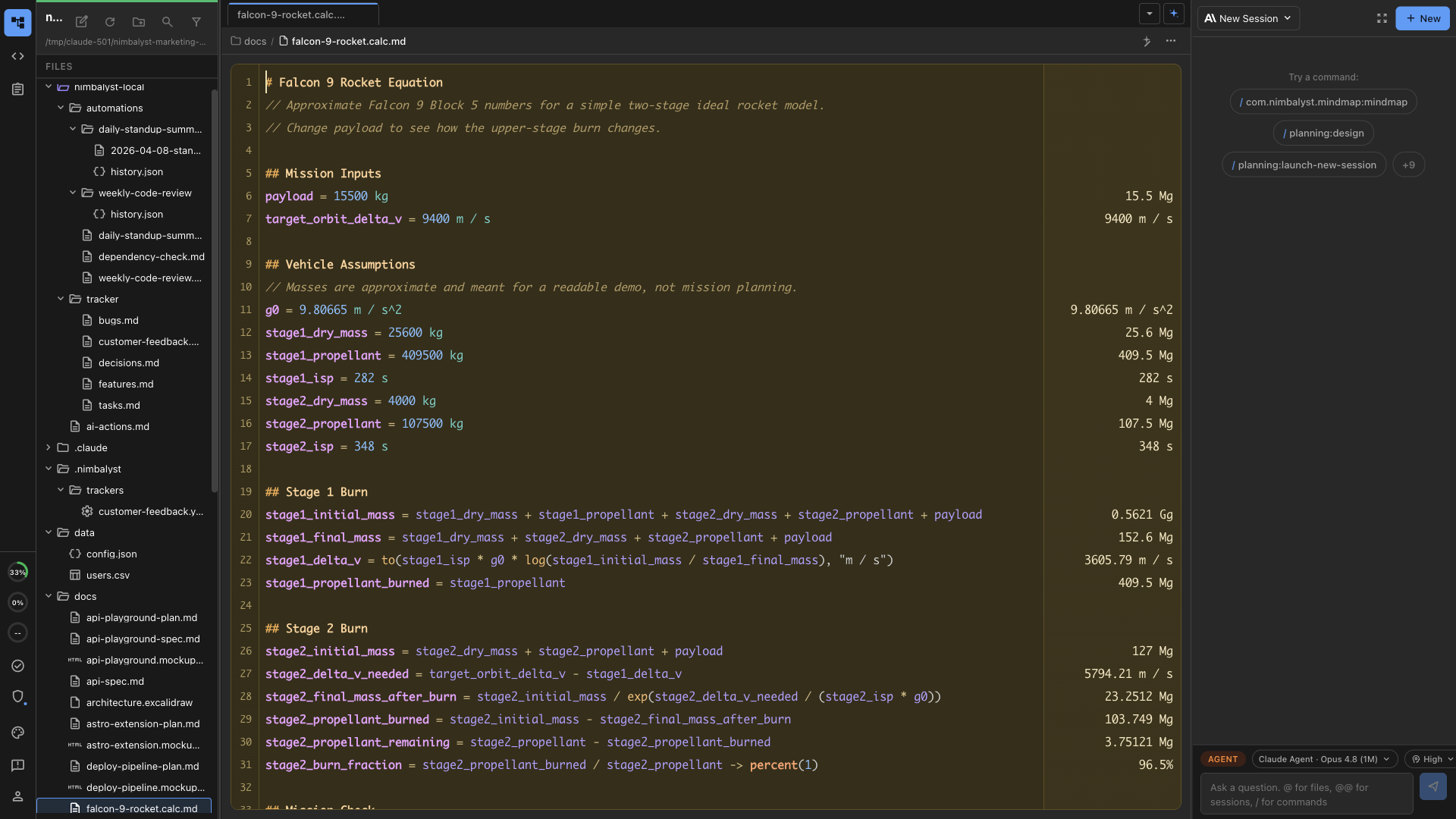
Calc Sheets are markdown documents that end in `.calc.md`. They combine spreadsheet-style calculated results with plain-text editing, so you can keep assumptions, formulas, notes, and outputs together in one versionable file.
Unlike a CSV grid, a Calc Sheet reads like a working document. You write inputs and formulas as text on the left, and Nimbalyst renders the evaluated results alongside them.
The [Calc Sheets extension page](https://nimbalyst.com/extensions/calc-sheets/) covers the formula syntax and unit handling in more depth.
## What Calc Sheets Are Good For
* Quick estimates, budgets, and pricing models
* Unit-aware calculations inside planning docs
* Financial notes where currency formatting matters
* AI-assisted calculation files that should still stay readable in plain text
* Scenario analysis where the assumptions matter as much as the final result
## Example
```md
# Inputs
price = 100 USD
quantity = 1
# Results
total = price * quantity -> currency(USD, 2)
```
In Nimbalyst, the source stays editable as markdown while the computed values appear beside it in a spreadsheet-like results column.
## Built-In Capabilities
* Text-first calculations in plain `.calc.md` files
* Units and currency-aware formatting
* Live result gutter beside the source
* Assertions so a sheet can catch invalid assumptions early
* Natural fit with Git, diffs, and agent-driven edits
* Source mode that stays readable in any text editor
## Calc Sheets vs CSV
Use **Calc Sheets** when the file is mostly a human-readable calculation document with a few important formulas.
Use **CSV** when the file is primarily tabular data with many rows and columns.
See also [CSV](/visual-editors-powered-by-ai/csv.md).
## Working with AI
Your coding agent can edit `.calc.md` files the same way it edits markdown or code. Good prompts include:
* "Turn this pricing note into a calc sheet with subtotals and a final total."
* "Add a margin assumption and recompute the quoted price."
* "Convert these hard-coded numbers into named inputs."
* "Add assertions so the total fails if quantity is negative."
* "Adjust the payload assumption and explain which checks changed."
---
# Agent Instructions
This documentation is published with GitBook. GitBook is the documentation platform designed so that both humans and AI agents can read, navigate, and reason over technical content effectively. Learn more at gitbook.com.
## Querying This Documentation
If you need additional information that is not directly available in this page, you can query the documentation dynamically by asking a question.
Perform an HTTP GET request on the current page URL with the `ask` query parameter, and the optional `goal` query parameter:
```
GET https://docs.nimbalyst.com/visual-editors-powered-by-ai/calc-sheets.md?ask=&goal=
```
`ask` is the immediate question: it should be specific, self-contained, and written in natural language.
`goal` is optional and describes the broader end goal you are ultimately trying to accomplish on behalf of the user. GitBook uses it to tailor the answer towards what is most useful for that goal.
The response will contain a direct answer to the question and relevant excerpts and sources from the documentation.
Use this mechanism when the answer is not explicitly present in the current page, you need clarification or additional context, or you want to retrieve related documentation sections.