> For the complete documentation index, see [llms.txt](https://docs.nimbalyst.com/llms.txt). Markdown versions of documentation pages are available by appending `.md` to page URLs; this page is available as [Markdown](https://docs.nimbalyst.com/visual-editors-powered-by-ai/excalidraw.md).
# Excalidraw
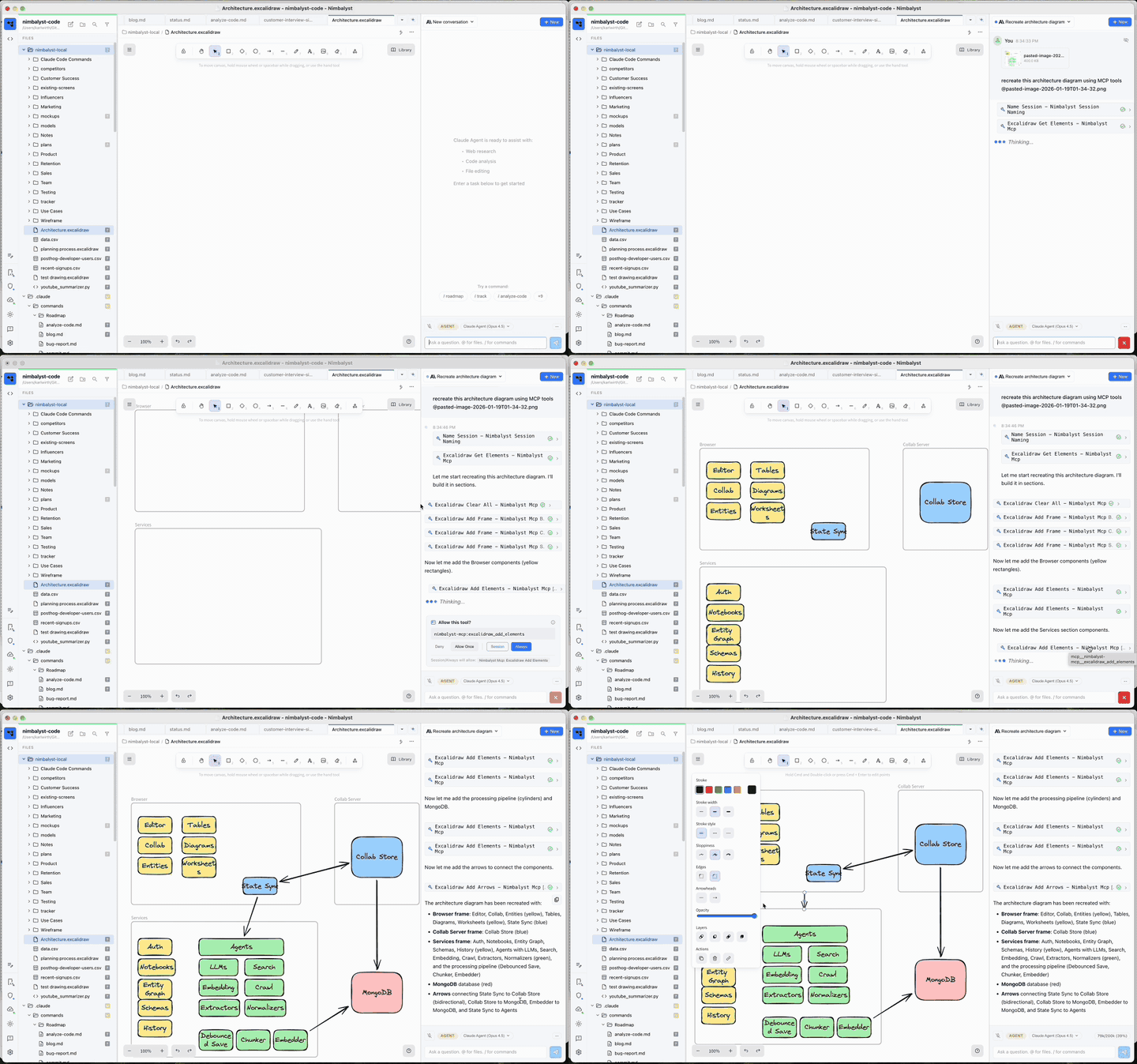
Draw diagrams, flowcharts, and whiteboard sketches in the built-in Excalidraw editor, and let your AI agent build them from a description.
### Overview
Nimbalyst includes a built-in Excalidraw editor for creating diagrams, flowcharts, and whiteboard sketches. Files open in a visual canvas where you can draw shapes, connect them with arrows, and let AI help build diagrams from descriptions.
The [Excalidraw extension page](https://nimbalyst.com/extensions/excalidraw/) lists what the built-in canvas supports.
### AI-Assisted Diagramming
Ask the AI to create or modify diagrams directly. The AI can:
* Add shapes with labels and colors
* Connect elements with arrows
* Import Mermaid diagrams
* Align and distribute elements
* Group elements together
* Create rows and columns of shapes
### Human Diagramming
Right-click in the file tree and select **New File > Excalidraw Diagram**, or create any file with the `.excalidraw` extension.
The toolbar provides standard Excalidraw tools:
* **Selection**: Click and drag to select elements
* **Rectangle**: Draw boxes (rounded by default)
* **Diamond**: Draw decision shapes
* **Ellipse**: Draw circles and ovals
* **Arrow**: Connect elements with arrows
* **Line**: Draw freeform lines
* **Text**: Add text labels
* **Frame**: Group related elements with a titled container
#### Example AI Prompts
* "Create a flowchart showing user login flow"
* "Add a blue rectangle labeled 'Database'"
* "Connect 'Frontend' to 'API' with an arrow"
* "Import this mermaid diagram: graph TD; A-->B"
* "Align all the boxes on the left"
### Mermaid Import
Convert Mermaid syntax to visual diagrams:
```
graph TD
A[Start] --> B{Decision}
B -->|Yes| C[Action]
B -->|No| D[End]
```
Ask the AI to import Mermaid, or use the `import_mermaid` tool directly.
### Working with Frames
Frames are titled containers that group related elements. Use them to organize architecture diagrams into sections like "Browser", "Services", or "Database".
Create frames manually or ask the AI: "Add a frame called 'Frontend' around the React components"
### Theme Support
The editor adapts to your Nimbalyst theme. Light themes show a white canvas; dark themes show a dark canvas with adjusted colors.
### Tips
* **Pan canvas**: Hold space and drag, or use two-finger scroll
* **Zoom**: Cmd/Ctrl + scroll, or use the zoom controls
* **Duplicate**: Alt + drag to duplicate elements
* **Snap to grid**: Hold Cmd/Ctrl while dragging for alignment
* **Lock elements**: Prevent accidental edits by locking shapes
### Diagrams on a Board
An Excalidraw file can sit on a [Canvas](/visual-editors-powered-by-ai/canvas.md) alongside the plan and mockups it explains, and stays editable there.
---
# Agent Instructions
This documentation is published with GitBook. GitBook is the documentation platform designed so that both humans and AI agents can read, navigate, and reason over technical content effectively. Learn more at gitbook.com.
## Querying This Documentation
If you need additional information that is not directly available in this page, you can query the documentation dynamically by asking a question.
Perform an HTTP GET request on the current page URL with the `ask` query parameter, and the optional `goal` query parameter:
```
GET https://docs.nimbalyst.com/visual-editors-powered-by-ai/excalidraw.md?ask=&goal=
```
`ask` is the immediate question: it should be specific, self-contained, and written in natural language.
`goal` is optional and describes the broader end goal you are ultimately trying to accomplish on behalf of the user. GitBook uses it to tailor the answer towards what is most useful for that goal.
The response will contain a direct answer to the question and relevant excerpts and sources from the documentation.
Use this mechanism when the answer is not explicitly present in the current page, you need clarification or additional context, or you want to retrieve related documentation sections.