> For the complete documentation index, see [llms.txt](https://docs.nimbalyst.com/llms.txt). Markdown versions of documentation pages are available by appending `.md` to page URLs; this page is available as [Markdown](https://docs.nimbalyst.com/visual-editors-powered-by-ai/mind-map.md).
# Mind Map
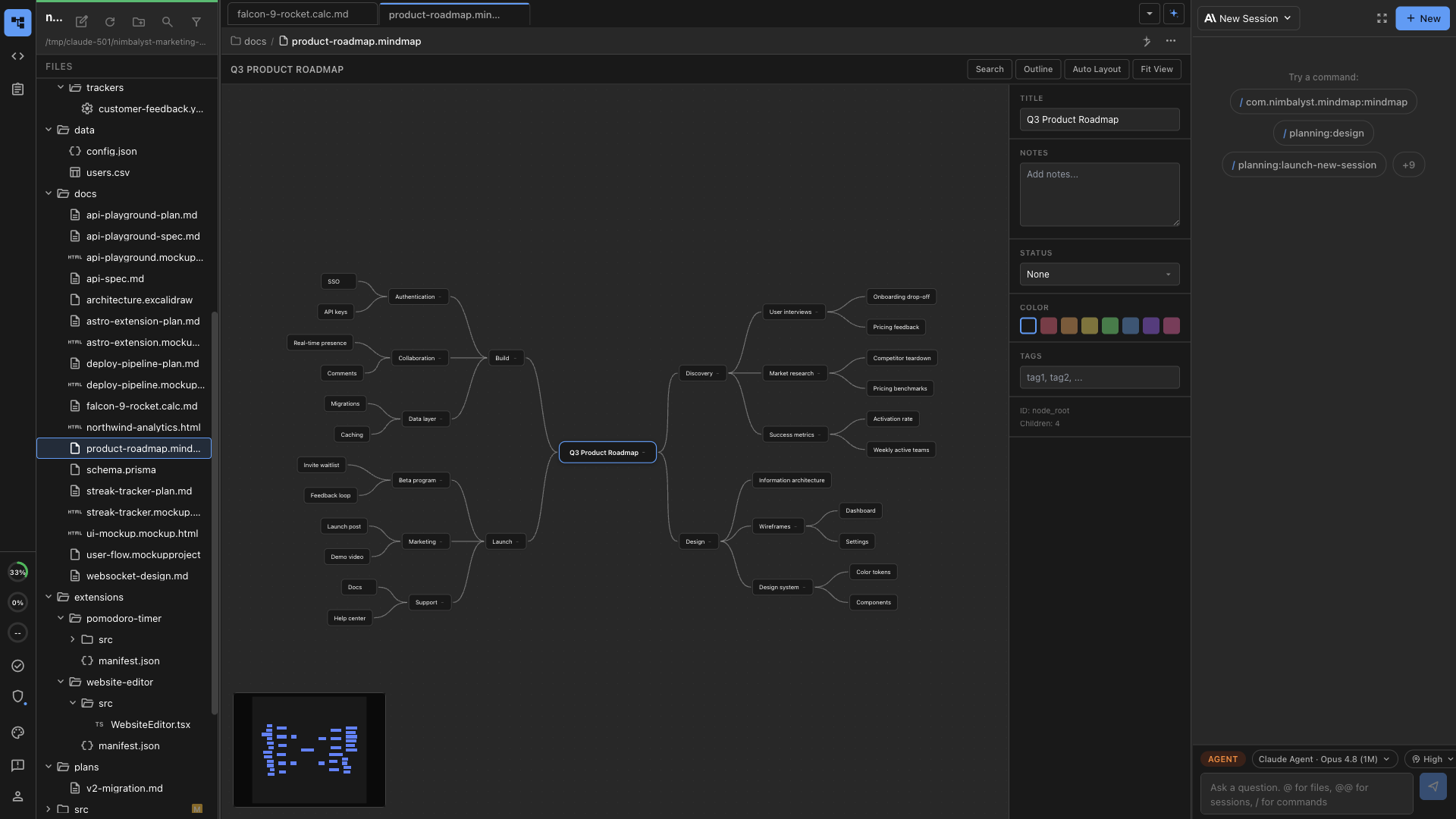
Mind Map is a spatial editor for .mindmap files. Brainstorm on an infinite canvas while the file stays plain text your AI agent can also edit.
Nimbalyst Mind Map is a spatial editor for `.mindmap` files. It lets you lay out ideas on an infinite canvas while keeping the underlying file readable, versionable, and editable by agents.
Use it for brainstorming, project planning, research organization, decision trees, and any topic where a hierarchy is easier to understand visually than as a long outline.
The [mind map extension page](https://nimbalyst.com/extensions/mindmap/) shows the file format and how agents edit maps.
## What Mind Maps Are Good For
* Breaking a project into themes, branches, and follow-up work
* Organizing research notes by concept or domain
* Capturing meeting ideas spatially while preserving structure
* Mapping product roadmaps, launch plans, and decision trees
* Turning a topic prompt into a structured map your team can revise
## Built-In Capabilities
* Infinite canvas with pan and zoom
* Nodes, branches, notes, tags, status, and color coding
* Keyboard-driven editing for adding children, siblings, and updates quickly
* Auto layout for cleaning up a map
* Outline view when a hierarchy is easier to edit as text
* Search across nodes
* AI-assisted creation and branch expansion
## Plain-Text Files
Mind maps are stored as `.mindmap` files. That means they can live with the rest of your project, sync like other files, and be reviewed in Git.
The visual editor gives you the canvas, but the file remains structured enough for Claude Code, Codex, and other agents to read and update.
## Working with AI
Your coding agent can create, expand, and reorganize mind maps. Good prompts include:
* "Create a mind map for this product launch plan."
* "Expand the Discovery branch with customer research tasks."
* "Reorganize this map into Design, Build, Launch, and Measure."
* "Add notes to each high-risk branch."
* "Turn this outline into a mind map."
---
# Agent Instructions
This documentation is published with GitBook. GitBook is the documentation platform designed so that both humans and AI agents can read, navigate, and reason over technical content effectively. Learn more at gitbook.com.
## Querying This Documentation
If you need additional information that is not directly available in this page, you can query the documentation dynamically by asking a question.
Perform an HTTP GET request on the current page URL with the `ask` query parameter, and the optional `goal` query parameter:
```
GET https://docs.nimbalyst.com/visual-editors-powered-by-ai/mind-map.md?ask=&goal=
```
`ask` is the immediate question: it should be specific, self-contained, and written in natural language.
`goal` is optional and describes the broader end goal you are ultimately trying to accomplish on behalf of the user. GitBook uses it to tailor the answer towards what is most useful for that goal.
The response will contain a direct answer to the question and relevant excerpts and sources from the documentation.
Use this mechanism when the answer is not explicitly present in the current page, you need clarification or additional context, or you want to retrieve related documentation sections.