# Mockups

Use all your context (docs, sessions, code) to build your mockups with your coding agent.

Use your mockups and docs to build your code. No copy/paste needed.

<figure><img src="/files/cM5WGjvJ5EDMbfZVFkXJ" alt=""><figcaption></figcaption></figure>

### Create a Mockup

Create the Mockup

* Select New -> New Mockup
* or type /mockup in the chat

Describe the Mockup you want created

* In the Agent chat, describe the mockup you want created
* Reference documents with the @ command
* Include images or screenshots into the agent chat

### Edit the Mockup

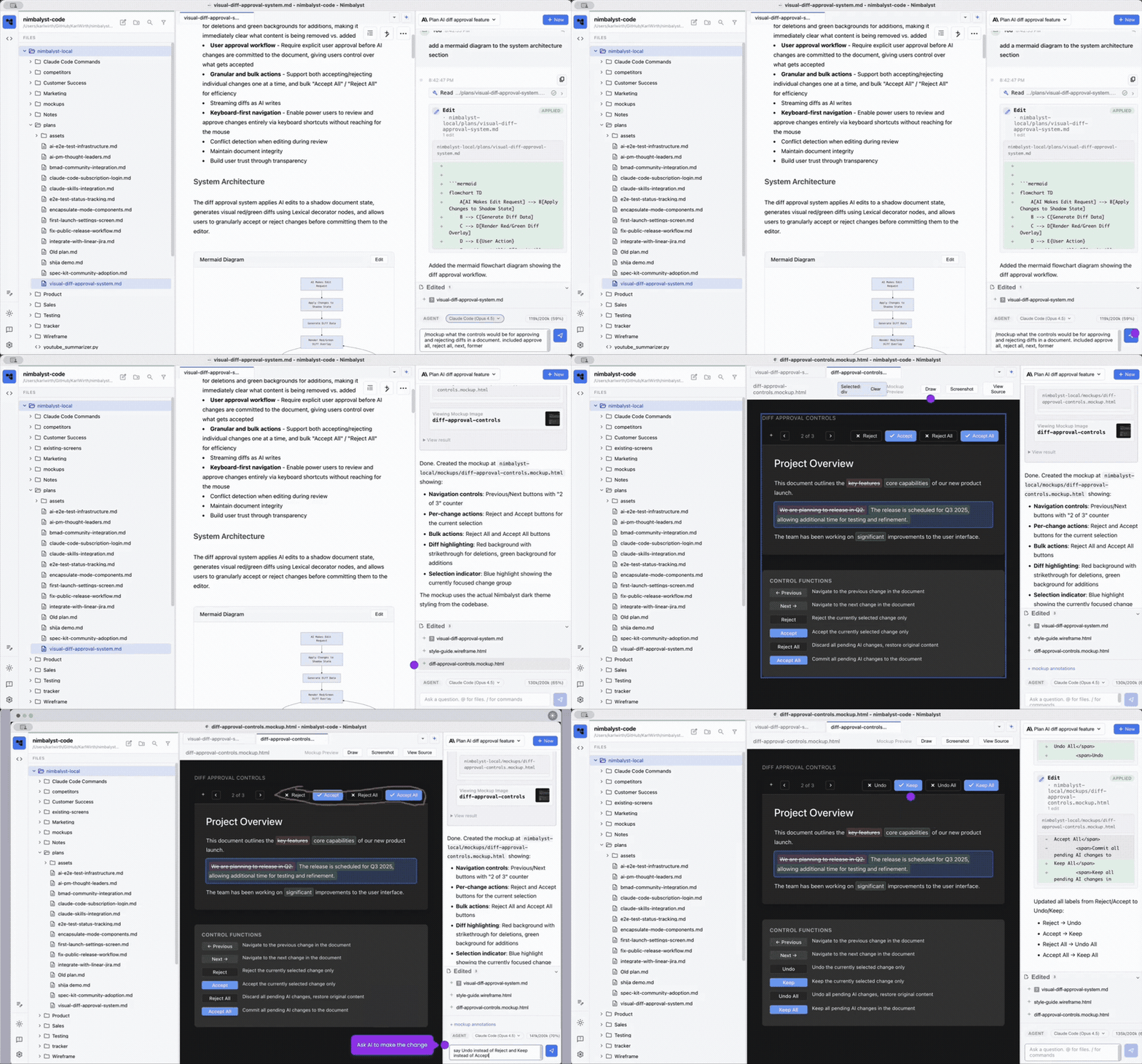
Open the mockup in the mockup editor (by clicking on it)

<figure><img src="/files/59r1dWmCxyRbMKg0b2TX" alt=""><figcaption></figcaption></figure>

**Edit it in 3 ways**

* Directly in the html
* By selecting a div and asking the AI to modify it
* By annotating the mockup by drawing on it and then asking AI to modify it

### Multi-Screen Projects

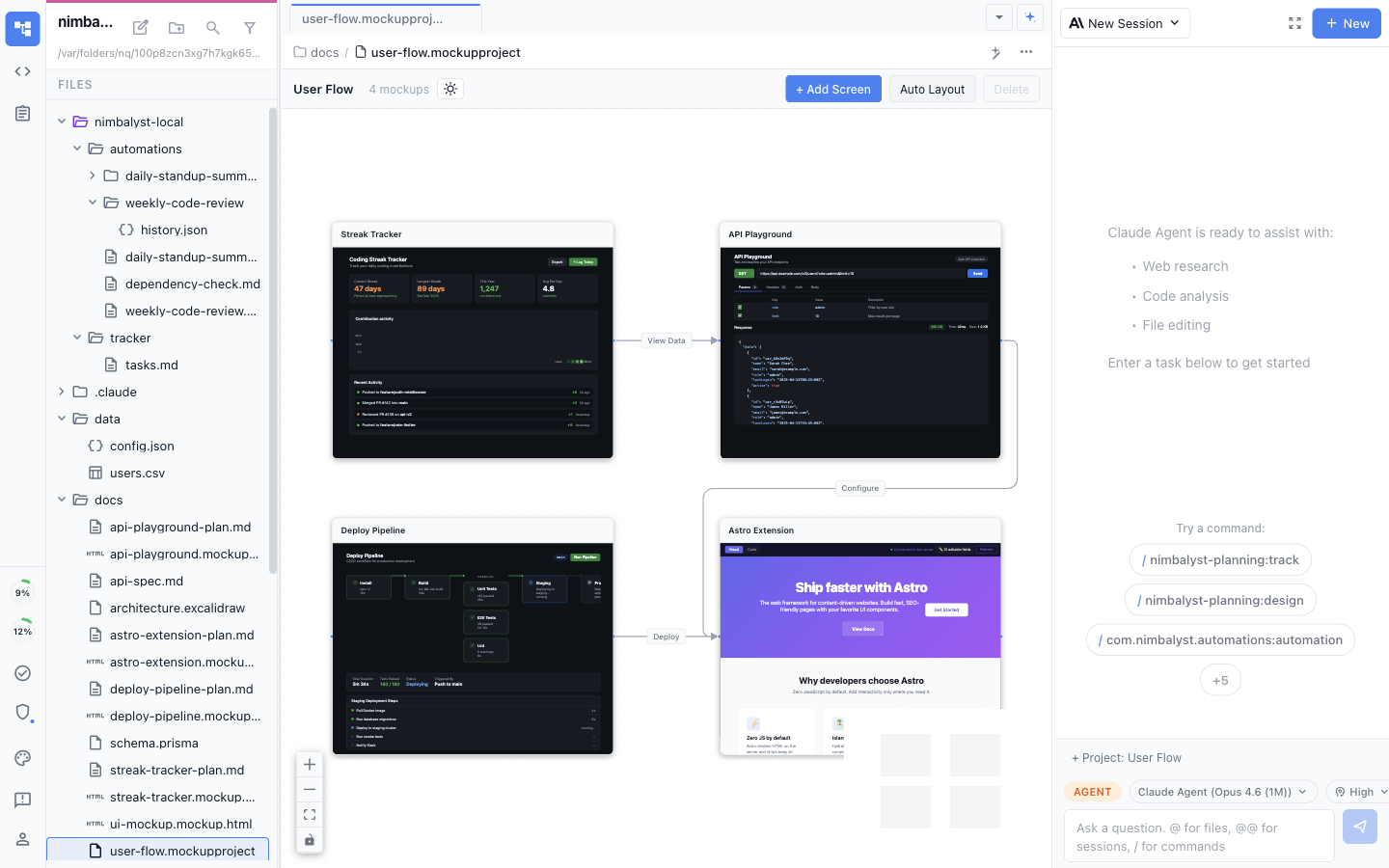
Group multiple mockup screens together to design full flows — checkout, onboarding, settings, whatever spans more than one screen.

<figure><img src="/files/ObYpYVxzB8Yzi4AnxTgd" alt=""><figcaption></figcaption></figure>

**Create a project**

* Select New -> New Mockup Project
* or type /mockup in the chat and describe a multi-screen flow

**On the canvas**

* Drag screens around to arrange them spatially
* Draw connections between screens to show navigation flow, and label the connections (click, hover, navigate)
* Click Add Screen to create a new mockup, or drag an existing .mockup.html in from the file tree
* Click Auto Layout to snap screens into a grid
* Double-click a screen to open it in the mockup editor

**File type and storage**

Projects are stored as .mockupproject files (JSON that references individual .mockup.html files). By default they live in Nimbalyst-Local/Mockups alongside your mockups.

### Insert a Mockup into a Markdown Document

<figure><img src="/files/LAg9u6goS8IXr7AQrvpP" alt=""><figcaption></figcaption></figure>

Select / and then insert a mockup

Click on the mockup to edit it

### Mockup File Type and Storage

Mockups are of file type .mockup.html

By default, they are stored in a Mockups Folder in Nimbalyst-Local, but you can change this.

## Working with the AI

### Tips for Better Results

* **Be specific about layout** -- "Two-column layout with 30% sidebar" is better than "add a sidebar"
* **Reference real products** -- "Style it like the Stripe dashboard" gives the AI a clear design reference
* **Describe interactions** -- "When hovering over a row, show a blue highlight and a delete icon on the right"
* **Iterate in small steps** -- Make one change at a time so you can evaluate each iteration

### What the AI Sees

When you ask the AI to edit a mockup, it:

1. Captures a screenshot of the current rendered mockup
2. Reads the HTML source code
3. Sees any annotations you've drawn
4. Understands which element you've selected (if any)

This multi-modal context means you can give instructions like "make the thing I circled bigger" and the AI understands what you're referring to.

### Design-to-Code Workflow

Mockups are real HTML and CSS, which makes them a useful bridge between design and implementation:

1. **Design in mockups** -- Iterate on the visual design with AI assistance
2. **Review with stakeholders** -- Share the rendered mockup for feedback
3. **Extract patterns** -- Use the mockup's HTML/CSS as a reference when implementing the real UI
4. **Maintain alongside code** -- Keep mockups updated as the product evolves for documentation

## File Format

Mockups use standard HTML with inline CSS. No special build tools or frameworks required.

```html
<div style="font-family: system-ui, sans-serif; max-width: 800px; margin: 0 auto;">
  <header style="padding: 16px; border-bottom: 1px solid var(--nim-border);">
    <h1 style="color: var(--nim-text);">Settings</h1>
  </header>
  <main style="display: flex; gap: 24px; padding: 24px;">
    <nav style="width: 200px;">
      <!-- Sidebar content -->
    </nav>
    <section style="flex: 1;">
      <!-- Main content -->
    </section>
  </main>
</div>
```

Using `var(--nim-*)` CSS variables ensures your mockup adapts to light and dark themes automatically.


---

# Agent Instructions: Querying This Documentation

If you need additional information that is not directly available in this page, you can query the documentation dynamically by asking a question.

Perform an HTTP GET request on the current page URL with the `ask` query parameter:

```
GET https://docs.nimbalyst.com/visual-editors-powered-by-ai/mockups.md?ask=<question>
```

The question should be specific, self-contained, and written in natural language.
The response will contain a direct answer to the question and relevant excerpts and sources from the documentation.

Use this mechanism when the answer is not explicitly present in the current page, you need clarification or additional context, or you want to retrieve related documentation sections.